• Aura Popular FAQs

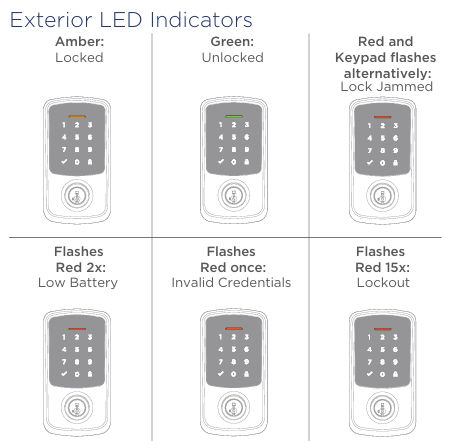
  • What Do The Different Colored Lights On The Status LED Mean?


    Aura

    • In normal operating mode:

      • Amber indicates locked.
      • Green indicates unlocked.
      • Red indicates low battery.

      For other operating modes, please see installation guide.
    Aura Reach

    • Tap the + icon in the top right corner of the Weiser app to begin adding your new lock. Follow the installation and lock setup instructions until you reach the Bluetooth Pairing stage of lock setup

    • aura reach LED


  • Can I Turn Off The Beeping Sounds?

    Yes, the following lock settings can be turn on/off via the Weiser App within Bluetooth range of your Aura lock:

    • LED
    • Audio/Beeps
    • Auto-Lock
  • Can I Set The Auto-Lock To Different Time Intervals?
    Yes, the auto-lock time delay can be customized using the Weiser App within Bluetooth range Aura.  The selectable time intervals are: 30 seconds, 1 minute, 3 minutes, 5 minutes, 10 minutes
  • Is My Device Compatible With My Aura Deadbolt?

    Compatible with 


    iOS: iPhone 6 or later models running iOS 12 or higher


    Android: All Android phones supporting Bluetooth 4.2 or higher and running Android OS 8.0 or higher

  • How do I install the Aura deadbolt?
    The Aura deadbolt is easy to install.  It installs in minutes with just a screwdriver with no hard wiring required.  The Weiser App includes an interactive guide and detailed step-by-step instruction.  Detailed step-by-step instructions can also be downloaded here.
Sign up and win

Sign Up and WIN!

Sign up for Weiser updates to stay informed about new products, promotions, latest trends and styles, and you'll be entered to win a $250 gift card.